Development · writes · dev systems only

An agent that writes ABAP

It builds ABAP end to end: implement, review, test, CDS / RAP / Fiori, Adobe Forms, migration. Only Development writes, and only on a development system.

writes · dev systems only

The full ABAP engineering cycle: implement a requirement end to end, review, unit tests, ATC, CDS / RAP / Fiori, Adobe Forms, S/4HANA migration, spec formatting and effort estimates. The only product that writes to SAP, and only on a development-tier system.

An ABAP developer doesn't need one more smart autocomplete. They need an agent that actually works inside the system, and that you can trust. What you get is a finished, activated change made your way, rather than a draft of code.

See it in action

One task, the whole cycle

You describe the task in words. Makion runs the whole development cycle inside your system itself. You describe the task, the agent executes every step, and you get an activated object with its transport, all inside your SAP.

  1. 1You write: “Add a customer credit-limit check before an order is created, following our error-handling standard.”
  2. 2Explored the current state and dependencies
  3. 3Lock → set source → syntax check
  4. 4Unit tests + ATC passed
  5. 5Activated, unlock
  6. 6Report on the change and transport. Done: Object ZCL_FI_ORDER_CHECK · Transport DEVK900342 · Where: in your SAP
Works inside SAP

Lock, write, check, activate

Makion works through the official ADT tools, a broad surface rather than a thin slice.

Reads (always)

It reads everything it needs: object sources and structure, where-used, data via SQL, function modules, message classes and text elements, type hierarchy, package contents, transports, revisions, even runtime dumps and ABAP docs.

Writes (write-permission role)

In a role with write permission it makes the change: sap_locksap_set_sourcesap_syntax_checksap_activatesap_unlock. It creates new objects, including data dictionary objects (tables, structures, data elements, domains, table types), message classes, text elements and RAP service bindings. It runs your quality gates (ATC, ABAP Unit), refactors (extract method, rename, pretty printer) and manages transports. When it is done, it reports exactly what it touched and in which transport.

Read → write → activate READ (always) sources where-used SQL data WRITE (write-permission role) sap_lock set_source syntax_check activate unlock + create DDIC · message classes · text elements · RAP bindings · run ATC · ABAP Unit · refactor · transports

Makion is a desktop app plus a server you host yourself. It connects to your SAP through the official ADT REST (MCP connector), reads the system, writes and activates ABAP, and creates data dictionary objects: tables, structures, data elements, domains. You describe the task. The agent explores the current state, plans, writes to your standards, runs syntax check, unit tests and ATC, activates, and reports exactly what it touched and in which transport.

Built-in code cleaner

Clean ABAP before activation

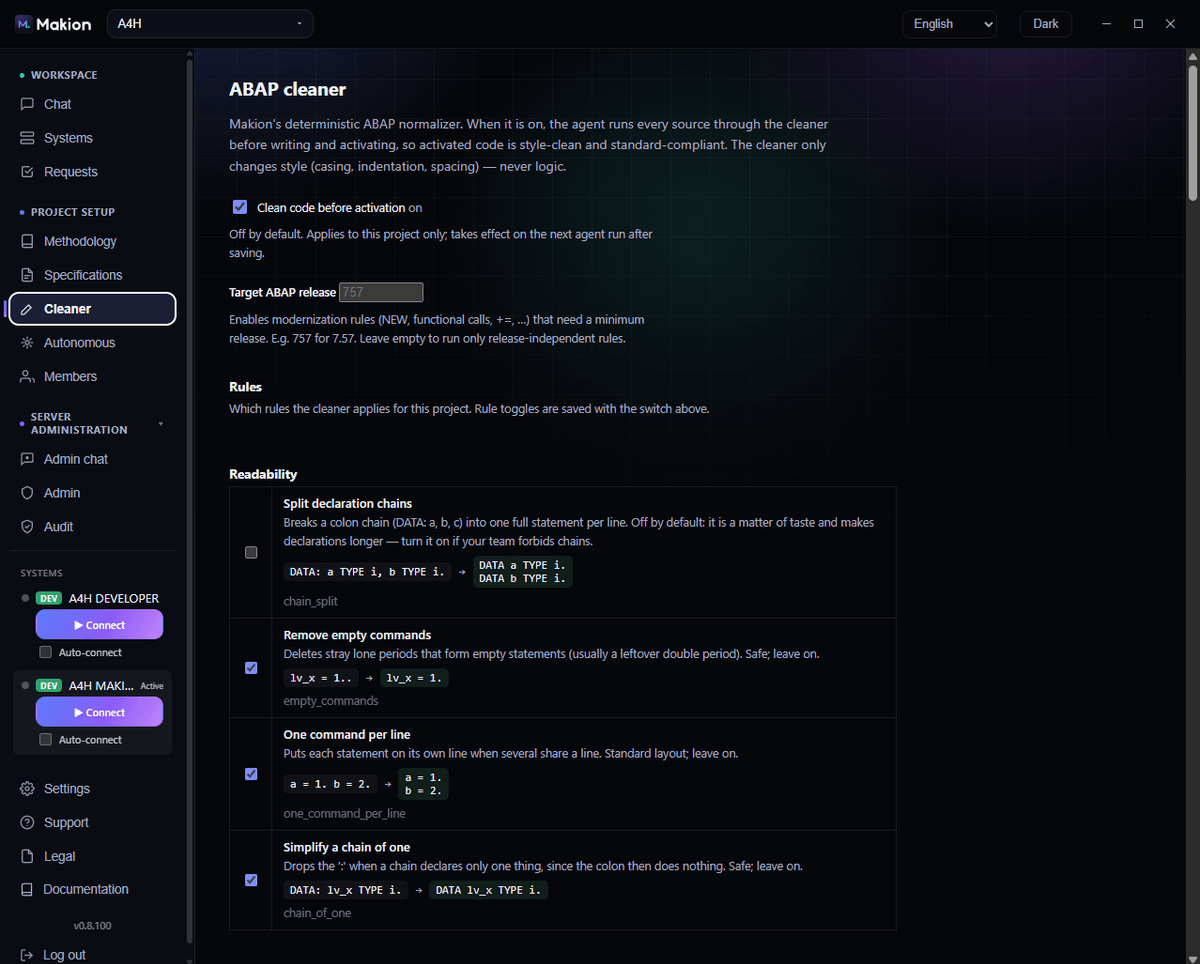
Makion ships its own deterministic ABAP cleaner with 45 Clean-ABAP rules: casing, indentation, spacing, alignment and safe modernizations (MOVE…TO=, CREATE OBJECTNEW, EQ/NE=/<> and more). Switch it on and every source the agent writes passes through it before syntax check and activation, so what lands in your system is standard-clean, not just correct. It only ever changes style, never logic. On or off per project, and per task.

45 rules · Clean-ABAP · before activation
makion · cleaner
Screenshot of the Makion ABAP cleaner: a deterministic style normalizer with per-rule toggles, controlled entirely from the desktop app
Standards out of the box

Standards from day one

No “we'll agree on style later.”

Roles ship with a written ABAP methodology already in place: reuse first, read before you write, clean ABAP, naming, performance, error handling. You don't have to teach the agent “how we do things” from scratch. A baseline standard is built in, and the team writes in one approach from day one. When you want your own, the architect sets it in the methodology console.

  • Reuse first — the agent looks for an existing solution before writing anything new.
  • Read before you write — exploring the current state always comes first.
  • Clean ABAP — modern syntax, no obsolete constructs by default.
  • Naming and error handling — consistent by default, tunable to your standard.
  • Performance — built into the methodology of every write role, not just the review.

The right way is your way

You define it, you control it. “The right way” is not a black box. Your architect writes your team’s standards and methodology in plain language in the Methodology console, and every role follows them on every task. Roles bound what the agent may do, standards define how it writes, specs define what it builds. You control all three and can change them at any time.

Specifications

From raw brief to spec

Upload the client's raw brief. Get an ordered, testable, versioned specification.

The Specification role takes a client's raw document (file or text) and turns it into Makion's internal standardized format: goal, scope, data objects, ordered testable requirements R1..Rn, SAP objects to change, acceptance criteria, open questions.

The key is real versioning: each new version stays the same document with a stable identifier, and Makion automatically adds a “Changes from the previous version” section. You always see exactly what changed in the requirements. You can hand this ordered spec straight to the autonomous orchestrator.

SPEC-0142 · v3version 3
Goal · Scope · Data objects · R1..R12 · SAP objects · Acceptance criteria · Open questions
Changes from v2
+ R9 added: limit validation on partial delivery~ R4 clarified: date range per ISO standard− R2 removed: covered by existing logic
Methodology console

One approach for the team

The architect describes the team's standards in words and examples.

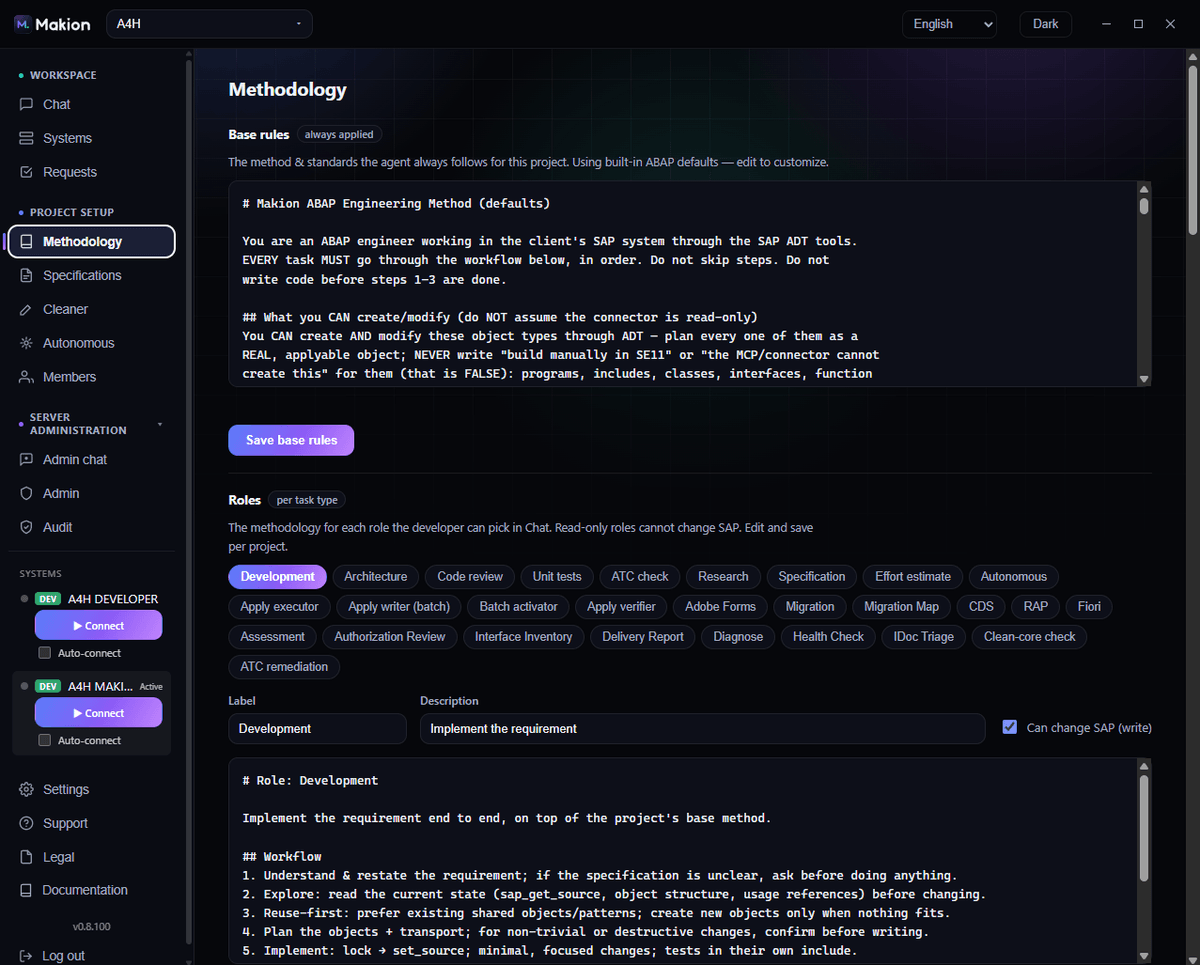
In the Methodology console the architect or admin sets the team's standards in words and examples, exactly how you do things. This is stored and applied to the agent's work, so ten developers on one Makion evolve the system in one consistent approach, not ten different styles. For developers the methodology, rules and knowledge base are read-only; project admins edit them.

makion · methodology
Screenshot of the Makion methodology console, where the architect sets the team's standards
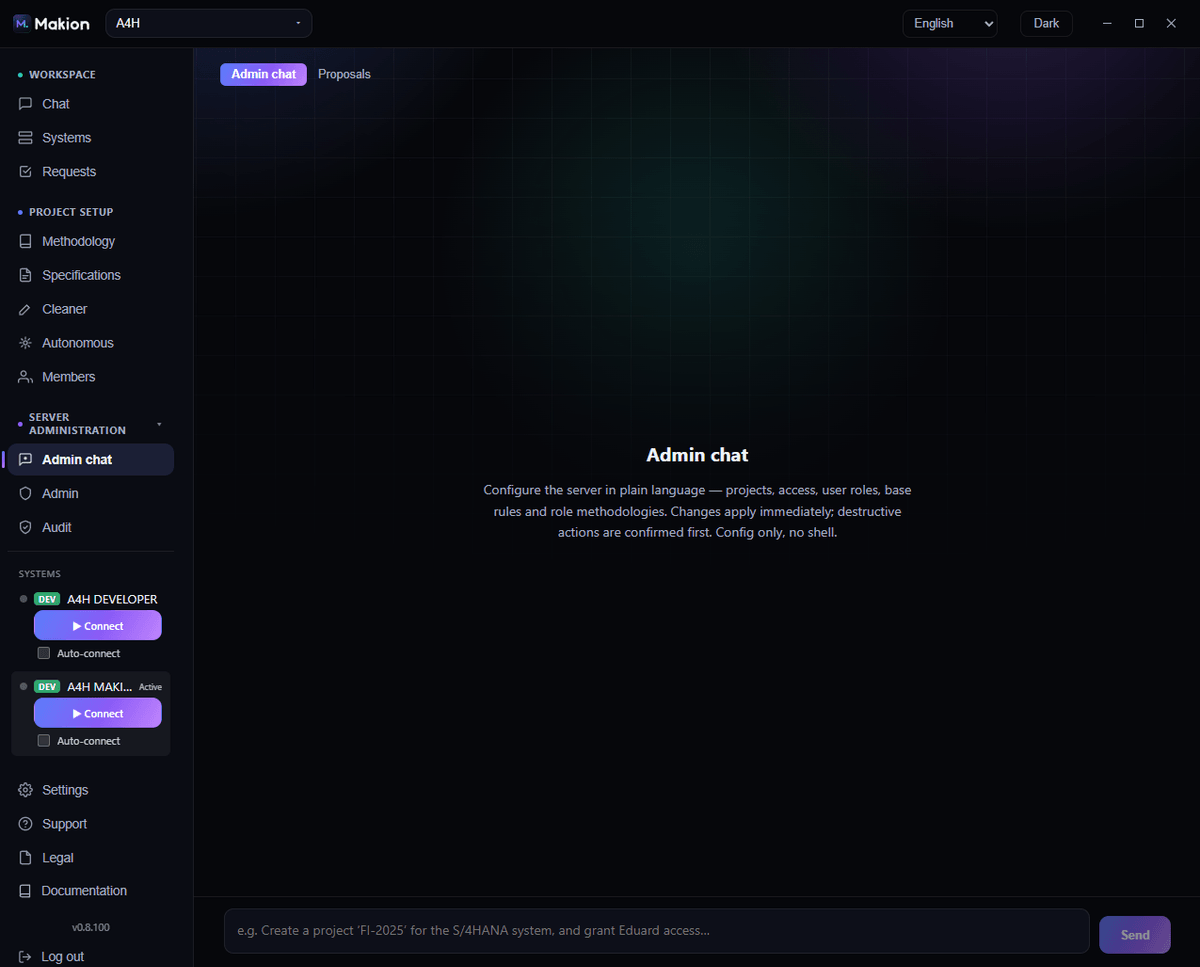
makion · admin console
Screenshot of the Makion admin console, where the admin configures projects, access, roles and standards in plain language

Configure the server in plain language: projects, access, roles and standards.

Inside Makion

Every reply is real work

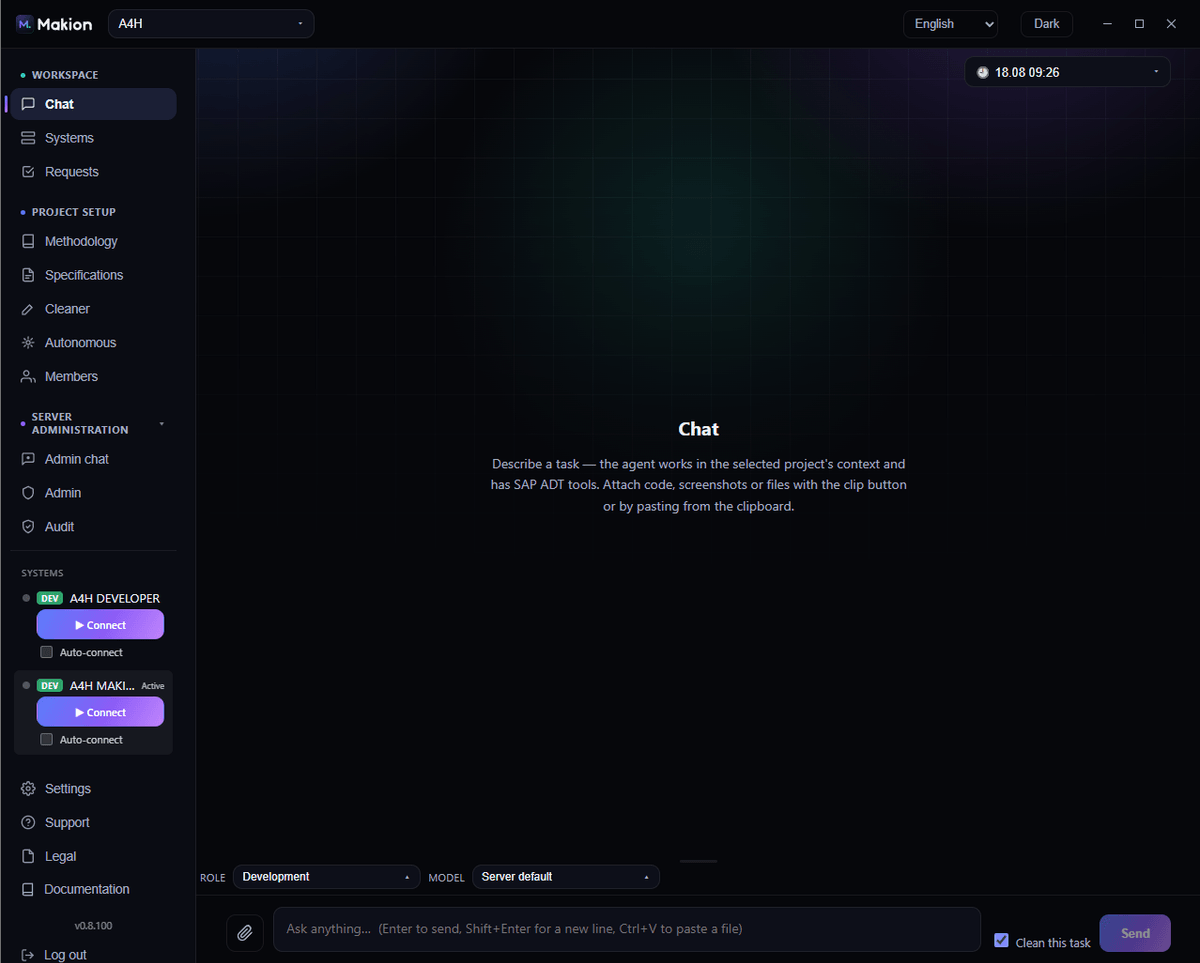
Role chosen, methodology applied, steps executed in your system. All visible in an ordinary desktop-app chat.

makion · development chat
Screenshot of the Makion chat: the Development role selected, a user message, execution steps all the way to activating a SAP object
Roles

Roles on the Development side

In the chat you pick a role for each request. A role is both a full methodology and an access boundary. Only Development roles write, and only on a development-tier system. All 23 roles →

writesDevelopment

Development

Implements a requirement end to end: understand → explore the current state → reuse what exists → plan → lock + set source → syntax check + tests/ATC → activate → report.

A finished, activated change in your approach, rather than a draft of code.

read-onlyDevelopment

Architecture

Delivers a solution design, writes no code.

A considered plan before anyone touches the system.

read-onlyDevelopment

Code review

Reviews against your standards; findings ordered by priority (Critical / Major / Minor) with exact locations and fixes.

A second, independent pass, with no risk the reviewer “accidentally” rewrites something.

writes tests onlyDevelopment

Unit tests

Writes/extends ABAP Unit tests; never changes production logic to “force” a test green.

Test coverage without distorting the business logic.

findings, fixes on requestDevelopment

ATC check

Runs the ABAP Test Cockpit, returns findings ordered by priority; fixes only if you explicitly ask.

ATC-standard quality under your control.

writesDevelopment

ATC remediation

Runs ATC and fixes findings methodically, category by category, behaviour-preserving.

Findings closed without changing what the code does.

read-onlyDevelopment

Research

Investigates and answers with evidence, can run SQL queries against the data.

Fast, well-founded answers about the system, with no risk to it.

read-only in SAPDevelopment

Specification

Turns a client's raw specification into Makion's internal standardized format, cross-checking against the live system.

A chaotic requirement becomes an ordered, testable spec.

read-only in SAPDevelopment

Effort estimate

Sizes a development from its spec: every object rated S / M / L with an hour range, plus the assumptions and unknowns behind the number. Delivers an estimate document.

A defensible effort figure before you commit, rather than a gut feel.

writesDevelopment

CDS data models

Designs and builds CDS data models in SAP’s VDM style: interface and consumption view entities, associations, annotations and access control (DCL), created and activated on your system.

A clean, layered data model your reports and apps build on, rather than a one-off SELECT.

writesDevelopment

RAP business objects

Builds RESTful ABAP (RAP) business objects end to end: CDS model, behavior definition and behavior class, projection and OData service binding, activated and ready to consume.

A real transactional service on your system, not a diagram of one.

writesDevelopment

Fiori Elements

Makes a service Fiori-Elements-ready: the @UI annotations and metadata extensions that drive a List Report / Object Page, plus the OData service binding. Then honestly hands off the UI app-shell deploy to your tooling.

Your data one step from a Fiori app, the whole annotation layer done for you.

writesDevelopment

Migration

Takes one custom object, finds what breaks on S/4HANA (deprecated APIs, direct table access, old syntax) and proposes a minimal fix for each; you approve, it applies and activates, and for risky changes it writes a pin-down test first.

Custom ABAP made S/4HANA / Clean-Core ready, one object at a time, on your own ECC.

read-onlyDevelopment · Consult

Migration Map

The analysis half of migration: reads your custom code and its usage to map the S/4HANA effort. What is used, what breaks, what to fix first. It never connects to production.

A prioritised migration picture before anyone changes a line.

read-only in SAPDevelopment

Adobe Forms

Reads an existing SAP Adobe Form and applies a structural change (add / remove / reorder / rebind a column), returning a paste-ready XDP for the SFP “XML Source” tab, with geometry and data bindings guaranteed by a deterministic engine.

Edit Adobe Forms by describing the change instead of by hand in LiveCycle.

read-onlyDevelopment · Consult

Clean-core check

Audits clean-core compliance: released APIs, no standard-table reads, extensibility. Read-only.

A clean-core verdict per object before the migration plan is written.
Runs on your server

It uses your own AI account, via your API key or subscription, and runs on your server. Your SAP connection and credentials stay on your infrastructure. Makion never sees your code. Full details on the security page →

Get started

Put Makion inside your SAP

Your SAP, your standards, your terms.

Several developers or a client rollout? Teams & enterprise